Picture Translator: Translate a Picture or Photo to English
A picture translator for screenshots, photos, scans and comics. Drop in a picture and AI reads the text in it, whatever the language, translates it into English or the language you pick, and paints the translation back where the text was. You get a PNG at the original size. If you would rather keep the picture on your computer, switch to Fast mode: the text is read on your own machine and only the words are sent to be translated.
Only need the words, not a translated picture? Image to Text copies them out with no daily limit. Translating a whole document? Use the PDF Translator. Weighing other tools? We tested 7 free image translators side by side.
- Detects the language for you
- No account
- No watermark
- 5 pages a day free
What leaves your computer
In AI mode, which is the default, a reduced copy of the picture is sent so AI can read and translate it; it is not stored. In Fast mode, only the text: the picture is read on your own machine and stays on your disk, and only the words found in it go to the translation model.
What it can read
Japanese, Korean, Chinese, Arabic, Thai, Hindi, the European languages and many more, including pictures that mix two of them. AI mode works out the language by itself. In Fast mode, Auto-detect picks it for you, or you can choose it above the queue; the wrong choice comes back as nonsense or as nothing.
How the free pages are counted
A page means 3000 characters of source text, counted on our side. A picture translated in AI mode uses 2 pages. In Fast mode, reading the picture costs nothing and only the text that gets translated is counted. When the day's 5 pages run out the tool stops until tomorrow, unless you have a pass: $9 for 1,500 pages, good for 30 days.
What this tool does for you
The parts worth knowing before you start.
AI reads comics and busy pictures
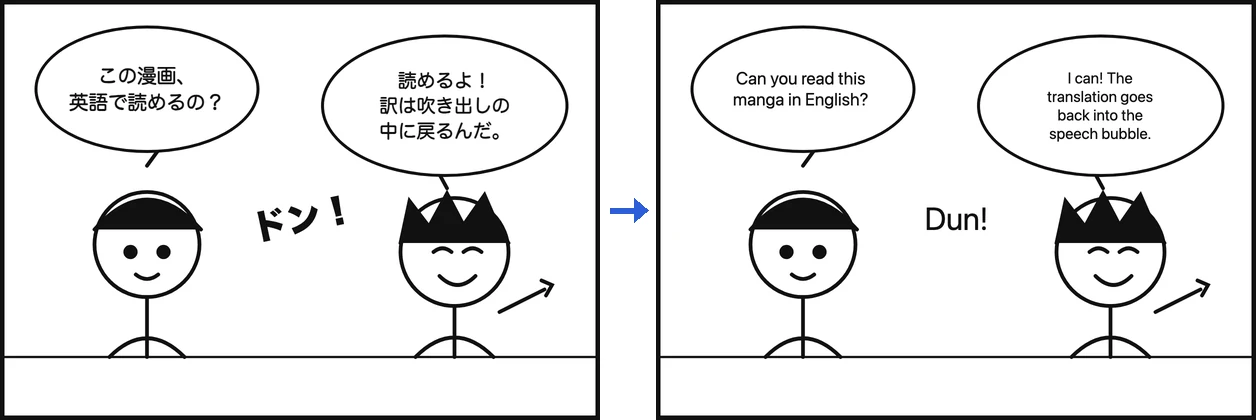
Speech bubbles, stylised lettering, a sign in a crowded street, two languages on one page. AI mode reads the picture as a whole and translates each line in context, not word by word.
The translation goes back where the text was
Each block is covered with the colour sampled from around it, and the translation is drawn inside the same box.
Fast mode keeps the picture on your machine
Switch to Fast and the picture is read in your browser; only the words found in it are sent to be translated. It works well on clean screenshots and documents. Auto-detect works out the language, or you can pick it yourself.
A daily page allowance
Translating calls a model, so there is a daily allowance of 5 pages. A picture in AI mode uses 2 pages. In Fast mode, reading the picture is free and only the translated text counts.
Translate manga, manhwa and comics
Drop in a manga page, a manhwa or webtoon panel, or a comic strip, keep AI mode on, and the text in each speech bubble is translated and drawn back inside the same bubble. Sound effects written over the art are translated too. The artwork around the bubbles is left as it was.
Pages go in one at a time. In AI mode each page uses 2 of the 5 free pages a day, so two comic pages a day are free; for a whole chapter, the $9 pass covers 1,500 pages for 30 days. Japanese, Korean and Chinese are read without choosing the language first.
How to use Picture Translator
Pick a picture and a language
Choose a picture: a screenshot, a photo of a sign, a comic page, a scanned page. Pick the language you want it in.
Let it translate
Press Start. AI mode takes about 20 seconds. In Fast mode the text is read on your machine first, so you see what it will use out of your allowance before anything is sent.
Download the PNG
Download the result as a PNG, or read the original and the translation as a list underneath it.
When people use it
A screenshot the person reading it cannot understand
Error dialogs, dashboards, a settings screen.
A photo of a sign, a menu or a label
Flat printed text, photographed straight on, is the case this handles best.
A scanned page with no text layer
A scan is a picture, so the PDF translator finds no text in it. This tool goes at the pixels instead.
A photo you just took on your phone
A menu, a sign or a product label abroad. Open this page in your phone's browser, choose the photo and download the translated PNG; there is no app to install.
Questions about Picture Translator
Is my picture uploaded?
In AI mode, which is the default, a reduced copy of the picture (at most 1024 pixels on its longest side) is sent to an AI model that reads and translates it; it is not stored. In Fast mode, no: the picture is read inside your browser and only the text it finds is sent to be translated. You can switch modes above the queue.
How can I translate text from a picture?
Drop the picture in, set "Translate into" to English, and press Start. AI mode works out the language in the picture by itself, reads the text, translates it and draws it back over the picture. Download the result as a PNG at the same pixel size as the original, with no watermark and no sign-up, or copy the original and the English from the list under it.
Can you translate something from a photo?
Yes, if the text in the photo is sharp and reasonably large: a sign, a menu on a table, a page from a book. AI mode copes with angled text and busy backgrounds much better than Fast mode. Handwriting, very low resolution and heavy shadow can still come out wrong or not at all. In Fast mode, when nothing readable is found, the tool says so and stops: nothing is sent and none of your daily allowance is used.
Can I use it on my phone?
Yes. It runs in your phone's browser, so there is no app to install. Take the photo of the menu, sign or label first, then open this page, tap the drop area and choose the photo; on many phones the picker also lets you take a new photo there and then. Press Start and AI mode reads it, which copes with angled or uneven text in a photo better than Fast mode. Download the PNG to your phone, or copy the translated lines from the list under it.
Can I Google Translate from a picture?
Yes. Google Translate on the web has an Images tab: you upload or paste a picture, and Google's help page says you can copy the translated text or download the translated image. You get the same two things here, and AI mode is good at comics and pictures where the text sits in bubbles or over artwork. If you would rather not upload the picture at all, Fast mode reads it inside your browser and sends only the words it finds.
What text can it read?
Japanese, Korean, Chinese, Arabic, Thai, Hindi, the European languages and many more, including a picture that mixes two of them. AI mode works out the language by itself. In Fast mode, leave "Text in the image is" on Auto-detect or pick the language yourself; the wrong pick comes back as nonsense, which you will see in the list under the result.
Which languages can it translate into?
60 languages: English, Simplified Chinese, Traditional Chinese, Japanese, Korean, Spanish, Portuguese, French, German, Italian, Russian, Arabic, Hindi, Indonesian, Thai, Vietnamese, Turkish, Dutch, Polish, Ukrainian, Czech, Slovak, Romanian, Hungarian, Greek, Bulgarian, Serbian, Croatian, Slovenian, Swedish, Danish, Norwegian Bokmål, Finnish, Estonian, Latvian, Lithuanian, Catalan, Galician, Hebrew, Persian, Urdu, Bengali, Tamil, Telugu, Marathi, Gujarati, Kannada, Malayalam, Punjabi (Gurmukhi script), Nepali, Malay, Filipino, Swahili, Afrikaans, Azerbaijani, Kazakh, Uzbek (Latin script), Georgian, Armenian, Mongolian (Cyrillic script). Pick one from the "Translate into" list on the tool.
Is there a free manga translator?
Yes, this one in AI mode. Drop in one manga, manhwa or comic page at a time: the text in each speech bubble is translated and drawn back inside the same bubble, and sound effects are translated too. Each page uses 2 of the 5 free pages a day, so two comic pages a day are free; for a whole chapter, the $9 pass covers 1,500 pages for 30 days. Japanese, Korean and Chinese are read without choosing the language first.
Why does the result look like text on patches?
The original text is covered with the average colour found around it, and the translation is drawn on top in a plain system font. On a white document or a flat screenshot the patch is invisible; on a photo, a gradient or a busy background you will see it. Fonts, colours, bold, italics and any effect on the original text are not reproduced.
Does the translation fit where the original was?
Usually. A translation is often longer than its source, so the type is shrunk to fit its box. When even the smallest size does not fit, the text runs past the edge of the box rather than being cut off.
Bought pages and lost them?
There is no account to log in to; your receipt lives in this browser, so clearing site data or moving to another machine loses it. Enter the email you paid with and we will send you a link. Open it in the browser where you want your pages.
Other tools
Compress Image
Make photos smaller without the upload
Reduce PDF File Size
Shrink a PDF without uploading it
Compress Video
Make a video file smaller
Crop Video
Drag a box over the picture and keep only that part
Video to GIF
Turn part of a video into an animated GIF
Combine PDF Free
Join several PDFs into one
PDF Splitter
Pull pages out of a PDF
PDF to JPG
Turn every page of a PDF into an image
PDF to Word
Turn a PDF into an editable .docx
Audio Trimmer
Trim an audio file
Video Cutter
Trim a video without re-encoding it
Crop Image
Drag a box over it, then rotate if it needs it
Merge Images
Put several pictures into one file
HEIC to JPG
Convert iPhone photos to JPG
JPG to PDF
Turn JPG and PNG images into one PDF
Video to MP3
Pull the audio out of a video
Word to PDF
Turn a .docx into a PDF, or one PDF per page
Markdown to Word
Turn a .md file into a .docx
Markdown to PowerPoint
Turn a Markdown outline into slides
HTML to Image
Turn an HTML file into one long PNG
Image to Text
Read the text out of a picture
Split Excel Sheets
One sheet, one file
Split Excel Rows
One row per file, or every N rows