Compress Image
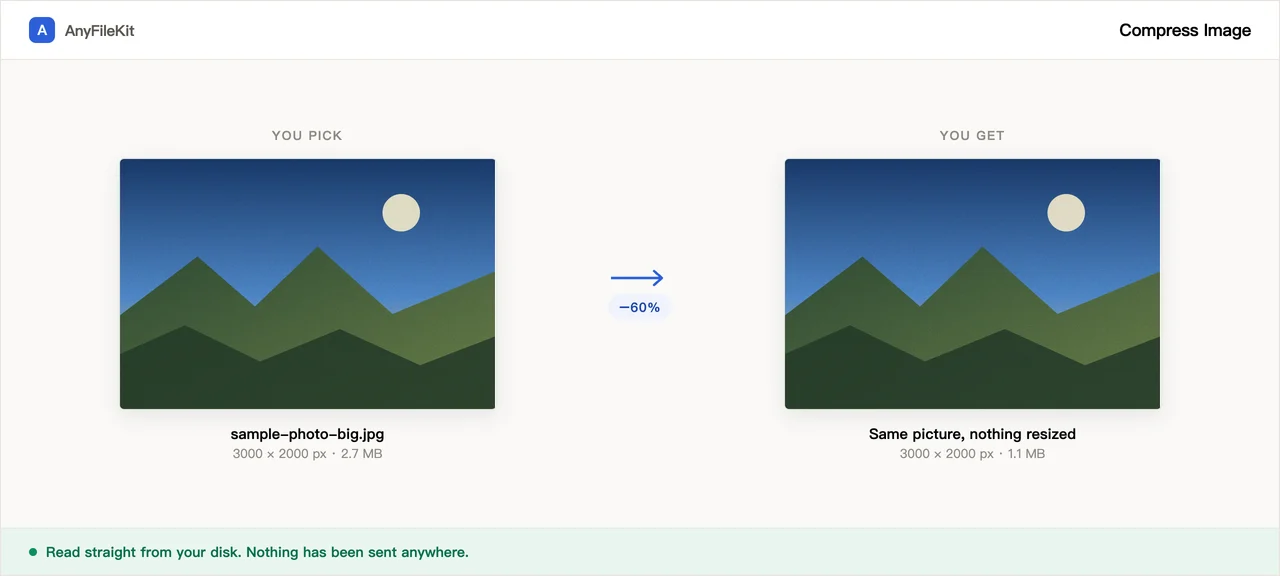
Re-encodes your images at a quality you choose. The pixel size stays the same, so the file gets lighter without the picture getting any smaller on screen. Everything happens on your own machine, and if a file would come out bigger than it started, the original is kept instead.
Picture larger than you need? Crop Image cuts it to the pixels you want. iPhone photo in HEIC? HEIC to JPG converts it first.
- No account
- No watermark
- No file limit
Your files
Nothing chosen yet.
What this tool does for you
The parts worth knowing before you start.
Pick the trade-off yourself
A slider, not a mystery preset. Move it and see exactly how much you saved on each file.
Never returns a bigger file
Already-optimised images often grow when re-encoded. When that happens the original is handed back untouched.
PNG becomes WebP
For screenshots and graphics, WebP is far smaller than PNG at the same quality, and every current browser reads it. Transparent areas stay transparent.
Location data comes off
A photo from a phone carries the spot it was taken, the camera model and the exact time. None of that is carried over. What you get back is the picture and nothing else.
Same size on screen
The width and height in pixels do not change. A photo that was 4000 across is still 4000 across afterwards, just in a lighter file.
The photos stay on your disk
No upload means no queue, no size cap, and no copy sitting on a server afterwards.
How to use Compress Image
Choose your images.
Set the quality slider. 70 is a good starting point.
Press Start, then download the smaller files.
When people use it
A form rejects your photo as too large
Upload limits of 1MB or 2MB are common on government and job sites. Drop the quality a little and it fits.
Making a page load faster
Photos straight from a phone are often several megabytes each. Most of that is invisible at screen size.
Emailing a batch of pictures
Mail servers usually cap attachments around 25MB. Compress first and the whole set goes in one message.
Posting a photo in public
Photos taken on a phone usually record where you were standing. Running one through here drops that before it goes anywhere.
Questions about Compress Image
Will the picture look worse?
At quality 70 most photos are hard to tell apart from the original at normal viewing size. Move the slider up if you can see a difference.
Why did my PNG turn into a WebP?
PNG cannot be compressed much further without changing format. WebP gives a much smaller file at the same quality and is supported everywhere current.
Are the images uploaded?
No. They are decoded and re-encoded by your own browser.
What if compression makes it bigger?
Then you get the original back. That happens with images that were already optimised.
Does this remove where the photo was taken?
Yes. The picture is read in and written out fresh, so the location, the camera model and the timestamp your phone attached do not come along.
Will the picture look smaller on screen?
No. Only the file gets lighter. The width and height stay exactly as they were.
Can I mix JPG, PNG and WebP together?
Yes, add them in one go. JPG comes back as JPG; PNG and WebP come back as WebP.
Is there a limit on how many?
No. Add as many as your computer can handle.
How far can I turn the quality down?
The slider runs from 30 to 95 in steps of 5, and it starts at 70. Lower numbers give smaller files and softer pictures. After a run, each file shows how many percent it shrank, and the line above the download button shows the total size before and after, so you can try again with a different setting.
Can I compress an image to an exact size like 100 KB?
There is no box for a target size. You set the quality and the page tells you what came out. If a file is still too big for the form you need it for, lower the slider a step or two and run it again. The pixel width and height stay the same either way.
Can I compress HEIC photos from an iPhone?
Not directly. This page takes JPG, PNG and WebP only, and HEIC is not on that list. Convert the photo with the HEIC to JPG tool first, then bring the JPG here if it is still larger than the form or inbox you are sending it to will accept.
How do I download a whole batch of compressed images?
With one image you get a single download button for that file. With more than one, the button saves everything as one zip called compressed-images.zip. Files that could not be made smaller are in the zip too, as their originals, so the set stays complete.
Other tools
Reduce PDF File Size
Shrink a PDF without uploading it
Compress Video
Make a video file smaller
Crop Video
Drag a box over the picture and keep only that part
Video to GIF
Turn part of a video into an animated GIF
Combine PDF Free
Join several PDFs into one
PDF Splitter
Pull pages out of a PDF
PDF to JPG
Turn every page of a PDF into an image
PDF to Word
Turn a PDF into an editable .docx
Audio Trimmer
Trim an audio file
Video Cutter
Trim a video without re-encoding it
Crop Image
Drag a box over it, then rotate if it needs it
Merge Images
Put several pictures into one file
HEIC to JPG
Convert iPhone photos to JPG
JPG to PDF
Turn JPG and PNG images into one PDF
Video to MP3
Pull the audio out of a video
Word to PDF
Turn a .docx into a PDF, or one PDF per page
Markdown to Word
Turn a .md file into a .docx
Markdown to PowerPoint
Turn a Markdown outline into slides
HTML to Image
Turn an HTML file into one long PNG
Image to Text
Read the text out of a picture
Split Excel Sheets
One sheet, one file
Split Excel Rows
One row per file, or every N rows