Split Excel Rows
Takes one sheet and writes it out as separate .xlsx files. Leave the rows-per-file box empty and you get one file per row, which is what you want for a mail merge. Put 500 in it and you get one file every 500 rows, which is what you want when the system you are importing into caps how much it will take at once. Either way the header row is copied onto each file, so every piece still reads like a table. Formulas become their last saved result.
Workbook has several sheets you want as separate files? Split Excel Sheets writes each one out as its own .xlsx.
- No account
- No watermark
- No file limit
Your files
Nothing chosen yet.
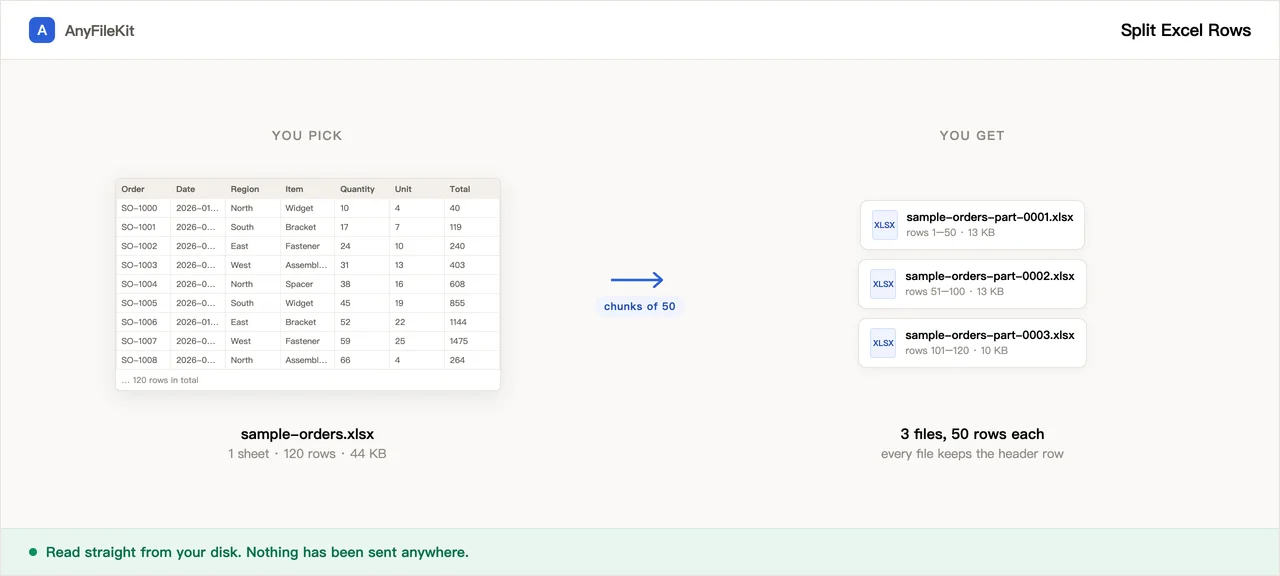
What this tool does for you
The parts worth knowing before you start.
One row per file, or every N rows
Two different jobs share this tool. Leave rows-per-file blank for one file per row: that is the mail-merge case, where each customer or invoice becomes its own document. Put a number in it to cut the sheet into equal blocks instead: 5000 when an import form refuses anything larger, or 20000 to hand four people a share each. The 2000-file ceiling counts output files, not rows, so chunking is how you get a very long sheet through it.
The header comes along
Each file gets row 1 on top and the data rows under it, so the columns still have names. Turn it off if your sheet is plain data with no headings.
Name the files after a column
Point it at the invoice number or the customer name column and you get INV-2041.xlsx instead of row-0037.xlsx. Slashes, colons and the other characters Windows rejects are swapped out, and duplicates get -2, -3 after them.
A real limit, said out loud
2000 files in one run. Above 200 it asks first and shows you the size. Give it a row range and do a 10000-row sheet in batches.
Everything past one file is a ZIP
Past the first file, everything arrives as one ZIP.
How to use Split Excel Rows
Choose an .xlsx, .xls or .csv file.
Say which sheet, which rows, and which column should name the files. All three can be left blank.
Press Start, confirm the count if it asks, and download the ZIP.
When people use it
A form that wants one record per file
Some portals and imports take a single record at a time, and you have a sheet with four hundred of them.
Mail merge that needs separate files
One file per recipient, each one still carrying the column headings.
Handing out rows without the rest of the sheet
Each supplier gets their own line and nobody sees the other lines.
Questions about Split Excel Rows
Does each file keep the header row?
Yes by default: row 1 goes on top of every file, with the data row under it. Untick the box if your sheet starts straight into data with no headings, and each file will hold that one row only.
What happens to formulas?
They are replaced by the value the spreadsheet last saved. A formula like =B7+C7 moved into row 2 of a new file would point at row 7 of that file, which is empty. If the file was written by a program rather than by Excel it may have no saved results, in which case those cells come out blank and the page tells you how many.
How many files can it make?
2000 in one run. Past 200 it stops and asks. For a bigger sheet, put something like 2-2000 in the row box, then 2001-4000, and so on.
Can I choose the file names?
Name them after any column: type the column letter or the heading text. Empty values, duplicates and characters Windows will not accept are handled: you get a numbered name, a -2 suffix, or an underscore in place of the character.
Does it take CSV?
Yes. A CSV is read as UTF-8 text and the files come out as .xlsx. Formatting is not a question there: a CSV has none.
How do I split rows from a sheet other than the first one?
Type the sheet name, or its position such as 2, in the sheet box. The name match ignores upper and lower case. If nothing matches, the page uses the first sheet and tells you so. Only one sheet is split per run, and only the first file if you add several.
What happens to blank rows?
Rows with nothing in any cell are skipped, so they do not turn into empty files or eat into the 2000-file limit. That also holds when you give a row range: blank rows inside it are left out. The page tells you how many it skipped once the run is done.
Other tools
Compress Image
Make photos smaller without the upload
Reduce PDF File Size
Shrink a PDF without uploading it
Compress Video
Make a video file smaller
Crop Video
Drag a box over the picture and keep only that part
Video to GIF
Turn part of a video into an animated GIF
Combine PDF Free
Join several PDFs into one
PDF Splitter
Pull pages out of a PDF
PDF to JPG
Turn every page of a PDF into an image
PDF to Word
Turn a PDF into an editable .docx
Audio Trimmer
Trim an audio file
Video Cutter
Trim a video without re-encoding it
Crop Image
Drag a box over it, then rotate if it needs it
Merge Images
Put several pictures into one file
HEIC to JPG
Convert iPhone photos to JPG
JPG to PDF
Turn JPG and PNG images into one PDF
Video to MP3
Pull the audio out of a video
Word to PDF
Turn a .docx into a PDF, or one PDF per page
Markdown to Word
Turn a .md file into a .docx
Markdown to PowerPoint
Turn a Markdown outline into slides
HTML to Image
Turn an HTML file into one long PNG
Image to Text
Read the text out of a picture
Split Excel Sheets
One sheet, one file