Markdown to PowerPoint
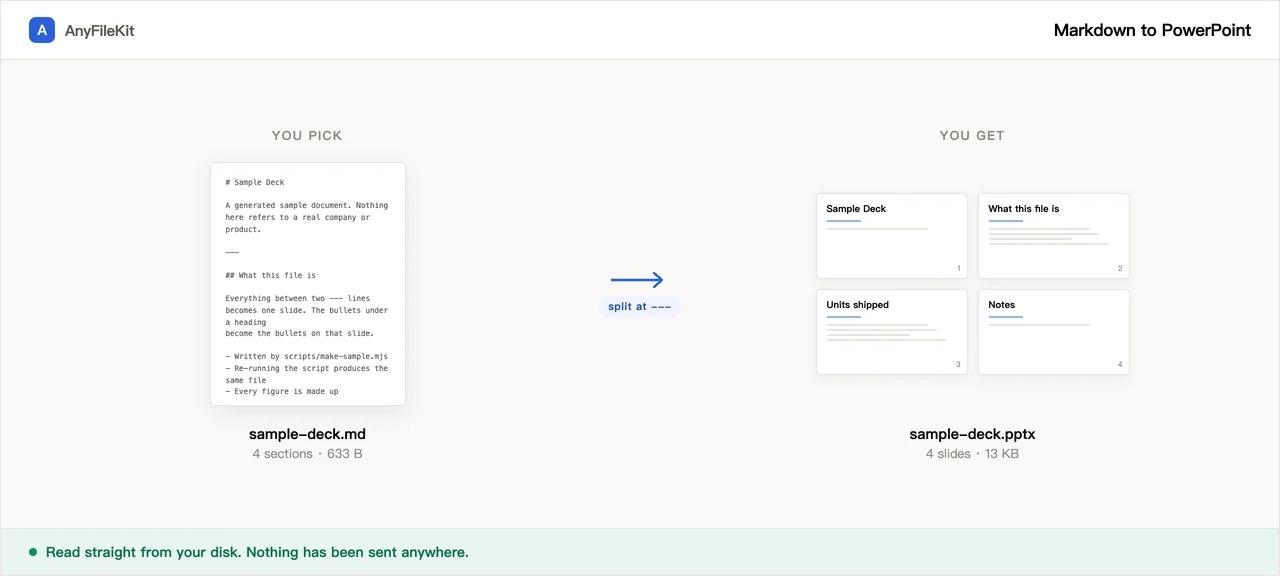
This page cuts a Markdown file into slides, at --- by default, the same place Marp and reveal.js cut, and writes a .pptx. It tells you the slide count before you press Start.
Need a document rather than slides? Markdown to Word turns the same file into a .docx.
- No account
- No watermark
- No file limit
Your files
A .pptx names fonts, it does not carry them. Pick what is installed where the deck will be opened.
Drop a file and the slide count appears here.
Nothing chosen yet.
What this tool does for you
The parts worth knowing before you start.
The slide count is there before you commit
Drop the file and the number appears under it, and it changes when you change where the cut happens. A file with no --- anywhere becomes one very long slide, and you see that here.
It cuts where the rest of the ecosystem cuts
A --- on its own line is what Marp splits on and what the reveal.js Markdown plugin looks for by default. A file written for either of those comes out with the same number of slides here. If yours is only ## headings and no rules, switch the cut and watch the count change.
Chinese, Japanese and Korean go in the right font slot
A .pptx names fonts, it does not carry them, and PowerPoint looks up East Asian characters in a different slot from Latin ones. Leaving that slot empty can show boxes on a machine set up for English. Every run written here fills both slots.
The outline never leaves the machine
Unreleased numbers, a reorg, a board update. The outline is turned into slides inside your browser; no step sends it anywhere.
How to use Markdown to PowerPoint
Drop your .md file in. The slide count shows up straight away.
Choose where it cuts: at --- only, or at headings as well. Then choose which font to name for Chinese, Japanese and Korean text.
Press Start and download the .pptx. Open it in PowerPoint, Keynote, Google Slides or WPS.
When people use it
Your notes are already the talk
You worked the argument out in a Markdown file and the meeting wants slides. The content does not need rewriting, it needs cutting.
Someone else has to present it
A .pptx is what gets asked for, and notes written as HTML comments land in the notes pane, which is where the presenter will look.
A deck that is really a document
Release notes, a status update, a checklist that has to be shown on a screen. One heading per slide.
Questions about Markdown to PowerPoint
Where exactly does it cut?
At a --- on its own line. That is what Marp splits on, and the reveal.js Markdown plugin looks for the same thing by default. You can ask for headings on top of that: # alone, or # and ## together. Headings are additive the way Marp headingDivider is: a --- still cuts even when heading cuts are switched on.
My file has --- under a line of text and I meant a heading
In CommonMark that is an H2, the underlined kind. Here it is a slide break. Write ## Like this if you wanted a heading.
What happens to images?
Only images written as data URIs are put in the deck. Images with an http address are not fetched; they are counted and reported, so you know how many are missing.
Will it look the same on the machine I present from?
The text will be there; the exact face may not. A .pptx names fonts rather than carrying them, so if the font you picked is not installed where the deck is opened, PowerPoint substitutes something else and the line breaks shift a little. The East Asian font slot is filled, which is the difference between a substituted font and a row of empty boxes.
How do I write speaker notes?
An HTML comment on the slide: <!-- slow down here, they always ask about cost -->. That is the Marp convention. A line beginning Note: also works, which is what the reveal.js plugin reads. Marp directives such as <!-- paginate: true --> or <!-- _class: lead --> are recognised as directives and dropped, so they do not turn into notes or into text on a slide.
What does not survive?
Themes and slide layouts, background images, columns, footnotes, maths, emoji as pictures, and any HTML beyond <br> and comments. Headings, paragraphs, bulleted and numbered lists with their nesting levels, bold, italic, strikethrough, inline code, fenced code blocks, blockquotes, tables, links and speaker notes all come through.
Does it produce a designed deck?
No. Everything lands on one plain layout: title at the top, content below, dark text on white. There is no theme picker. If the deck has to carry a brand, get the content into PowerPoint here and apply your template there.
Is the file really not uploaded?
No. The .md is read inside this tab and the .pptx is assembled inside this tab. There is no server here that could receive it.
Other tools
Compress Image
Make photos smaller without the upload
Reduce PDF File Size
Shrink a PDF without uploading it
Compress Video
Make a video file smaller
Crop Video
Drag a box over the picture and keep only that part
Video to GIF
Turn part of a video into an animated GIF
Combine PDF Free
Join several PDFs into one
PDF Splitter
Pull pages out of a PDF
PDF to JPG
Turn every page of a PDF into an image
PDF to Word
Turn a PDF into an editable .docx
Audio Trimmer
Trim an audio file
Video Cutter
Trim a video without re-encoding it
Crop Image
Drag a box over it, then rotate if it needs it
Merge Images
Put several pictures into one file
HEIC to JPG
Convert iPhone photos to JPG
JPG to PDF
Turn JPG and PNG images into one PDF
Video to MP3
Pull the audio out of a video
Word to PDF
Turn a .docx into a PDF, or one PDF per page
Markdown to Word
Turn a .md file into a .docx
HTML to Image
Turn an HTML file into one long PNG
Image to Text
Read the text out of a picture
Split Excel Sheets
One sheet, one file
Split Excel Rows
One row per file, or every N rows