Split Excel Sheets
Reads the workbook, writes each worksheet out as its own .xlsx, and hands you a ZIP. Values, formulas, number formats, column widths, merged cells and comments come across. Fonts, fill colours, borders, charts, conditional formatting and dropdown lists do not.
Need one sheet cut into smaller files by rows? Split Excel Rows writes one file per row or per batch. Step by step: how to split a large Excel file into separate sheets.
- No account
- No watermark
- No file limit
Your files
Nothing chosen yet.
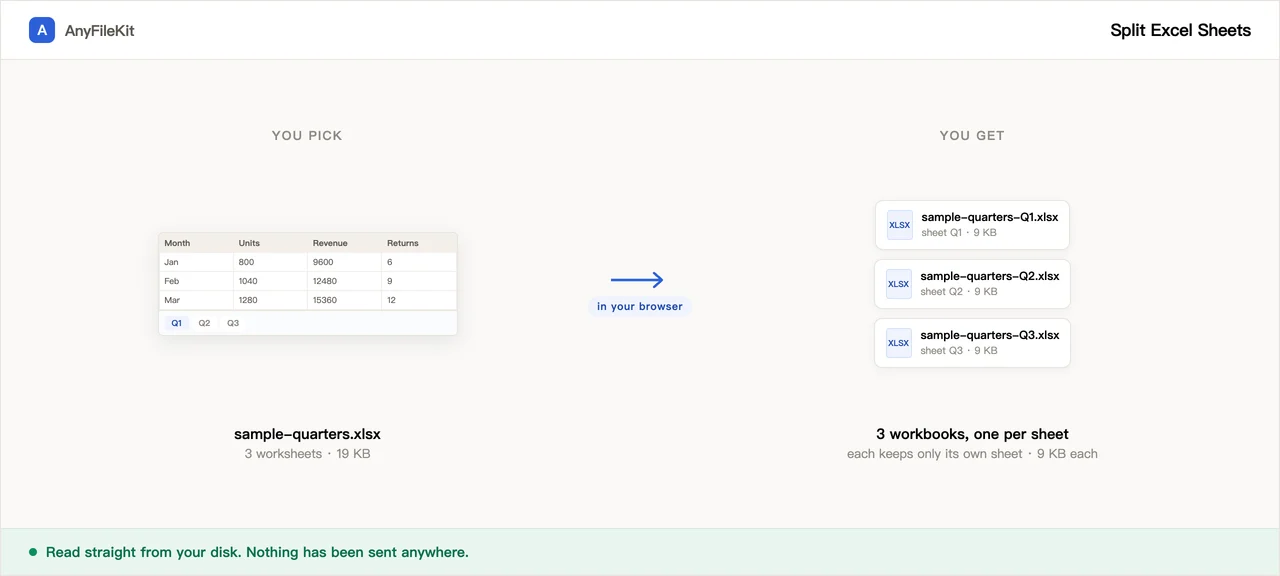
What this tool does for you
The parts worth knowing before you start.
It tells you what it drops
Cell colours, borders, charts, conditional formatting and dropdown lists are gone in the copies. The values, the formulas and the number formats come across intact.
Formulas stay formulas
A formula that only refers to its own sheet still works. One that points at a sheet left behind cannot, and the page counts those and tells you how many.
One ZIP, not thirty downloads
Everything past the first file arrives as a single ZIP.
Files named after the sheets
budget-Q1 Actuals.xlsx, not sheet1.xlsx. Slashes and colons are swapped out so the names work on Windows and macOS.
How to use Split Excel Sheets
Choose an .xlsx, .xlsm or .xls file.
Untick “skip empty sheets” if you want those too.
Press Start and download the ZIP.
When people use it
One tab per client, one file per client
A workbook where each tab is a customer, and each customer should only ever see their own numbers.
An upload form that takes one sheet
Plenty of accounting and payroll imports read the first sheet and ignore the rest.
Splitting a monthly pack for review
Send three people three files instead of one workbook with everybody’s tabs in it.
Questions about Split Excel Sheets
What exactly is lost?
Fonts, text colour, cell fill, borders, alignment, charts, conditional formatting, data validation dropdowns and macros. What survives is the cell values, the formulas, number formats such as #,##0.00, column widths, row heights, merged cells and comments.
Why are the colours gone?
The library that rebuilds the file in your browser writes number formats but not the rest of the styling. If the formatting matters, copy the sheet inside Excel instead.
Do formulas still work?
Formulas inside the same sheet do. Formulas pointing at another sheet cannot, because that sheet is not in the new file: Excel shows #REF!. The page counts them and tells you before you download.
Can it read old .xls files?
Yes, and .xlsm too. The output is always .xlsx. Macros in an .xlsm are not carried over.
Is the file uploaded?
No. The workbook is read and rebuilt inside your browser, and the ZIP is built there too.
Can I split several Excel workbooks at once?
Yes. Add them all and every sheet of every workbook becomes its own .xlsx. Each file name starts with the name of the workbook it came from, so two workbooks that both have a sheet called Summary do not overwrite each other. If two names still end up the same, the second gets -2 on the end. Everything goes into one ZIP, named after the first workbook.
What counts as an empty sheet?
A sheet with no values in any cell. A sheet that holds only a formula is not treated as empty, even if the formula shows nothing. Empty sheets are skipped by default and the page tells you how many it left out. Untick skip empty sheets before you press Start if you want a file for those too.
Are hidden sheets split too?
Yes. The page goes through every sheet listed in the workbook, hidden or not, so a sheet you cannot see in Excel still gets its own file. If you do not want it, delete that file from the ZIP before you send the set on.
How are the split files named?
Workbook name, a hyphen, then the sheet name: budget-Q1 Actuals.xlsx. Characters Windows will not accept in a file name, such as slashes, colons, asterisks and question marks, become underscores. Very long names are cut at 80 characters, and names Windows reserves, like CON or NUL, get an underscore in front.
Do I get a ZIP if the workbook has only one sheet?
No. When only one file comes out, for example a workbook with one sheet that has data and a few empty ones that were skipped, the button downloads that single .xlsx directly. The ZIP only appears when there are two or more files to hand back.
Can I pull out only one sheet?
There is no list to pick sheets from. The page splits every sheet that is not empty, and you take the one you need out of the ZIP. That still beats copying the sheet by hand when the workbook has dozens of tabs.
Other tools
Compress Image
Make photos smaller without the upload
Reduce PDF File Size
Shrink a PDF without uploading it
Compress Video
Make a video file smaller
Crop Video
Drag a box over the picture and keep only that part
Video to GIF
Turn part of a video into an animated GIF
Combine PDF Free
Join several PDFs into one
PDF Splitter
Pull pages out of a PDF
PDF to JPG
Turn every page of a PDF into an image
PDF to Word
Turn a PDF into an editable .docx
Audio Trimmer
Trim an audio file
Video Cutter
Trim a video without re-encoding it
Crop Image
Drag a box over it, then rotate if it needs it
Merge Images
Put several pictures into one file
HEIC to JPG
Convert iPhone photos to JPG
JPG to PDF
Turn JPG and PNG images into one PDF
Video to MP3
Pull the audio out of a video
Word to PDF
Turn a .docx into a PDF, or one PDF per page
Markdown to Word
Turn a .md file into a .docx
Markdown to PowerPoint
Turn a Markdown outline into slides
HTML to Image
Turn an HTML file into one long PNG
Image to Text
Read the text out of a picture
Split Excel Rows
One row per file, or every N rows