Merge Images
Merge images into one picture without uploading them. Pick a row, a column or a grid, set the spacing and the background, and watch the result before you save it. The awkward part of joining pictures is that they are rarely the same size, so this page makes you choose what happens: leave every picture at its own size and fill the gaps with the background, or scale the bigger ones down to match the smallest. It never enlarges anything.
Need to trim a picture before joining it? Crop Image cuts it to size. Making a flyer rather than a collage? Try the Poster Maker.
- No account
- No watermark
- No file limit
Your files
Every picture is drawn at its own pixel size and centred; the space left over is filled with the background colour. Nothing is resampled.
The larger pictures are scaled down until the shared edge matches the smallest picture. Nothing is ever scaled up.
Nothing chosen yet.
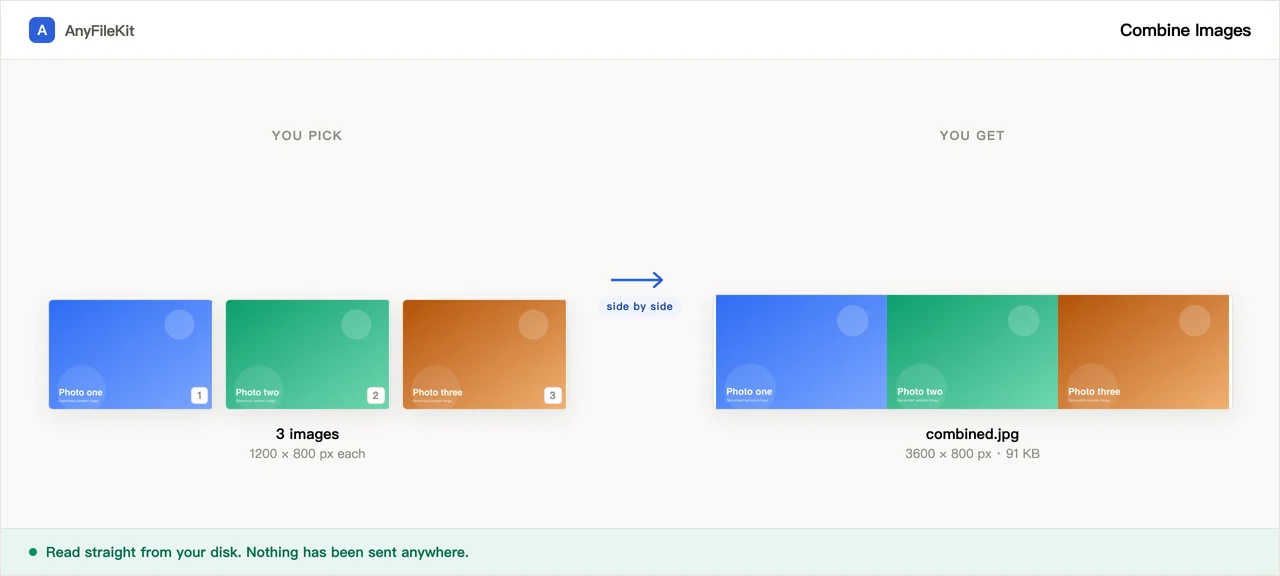
What this tool does for you
The parts worth knowing before you start.
You choose what happens when sizes do not match
When you merge images of different sizes, two choices are on the page: keep every picture at its own pixel size and pad the shortfall with the background colour, or shrink the larger ones until the edge that matters lines up. Which one you picked shows in the result.
A preview you can rearrange
When you merge images in your browser, the result is drawn before you export it, with arrows to move a picture earlier or later. Change the spacing or the background and it redraws as you type.
Transparency does not get painted over
Tick the transparent background and the result is a PNG with the gaps still see-through. Feed it any PNG or WebP and the result is a PNG, so an image with soft edges keeps them.
Big pictures, no upload queue
Four 6000 × 4000 photos is a 100 MB upload on a site that works by uploading. Here you merge images in your browser and nothing leaves the tab, so the only cost is the second or two your own machine spends drawing.
How to use Merge Images
Choose two or more images you want to merge. They join in the order they are listed.
Pick a row, a column or a grid, then the spacing, the background and what to do about different sizes.
Press Start to merge images in your browser, rearrange if you want to, and download the result.
When people use it
A before and after in one picture
Two photos side by side say the thing that two separate attachments never quite do.
Several screenshots for one bug report
Merge images into one the reader can scroll through, rather than five they have to open one at a time.
A grid of photos for a listing
Marketplaces that only accept one picture per item, and you have six angles of the thing.
Questions about Merge Images
What happens when my pictures are different sizes?
You decide. "Keep original size" draws every picture at its own pixel dimensions, centres the smaller ones in the space and fills the rest with your background colour. "Shrink to match" scales the larger pictures down until the shared edge (height in a row, width in a column) is the same as the smallest picture. Nothing is ever scaled up.
What file type do I get?
PNG if any of the pictures you gave it was a PNG or a WebP, or if you asked for a transparent background. Otherwise JPEG, written at quality 92.
Can I change the order?
Yes, in the preview. Each picture in the list has arrows to move it earlier or later, and the result redraws immediately.
Is there a limit on how many, or how big?
Not from us. The page caps the result at 16,384 pixels on a side and a hundred million pixels in total, a size every major browser can draw. If your combination would cross that line, the page scales it down to fit and tells you it did. It does not hand you an empty picture.
Are the pictures uploaded when I merge images?
No. There is no server. You merge images in your browser from the files on your own disk.
How do I merge images into one picture?
Add the pictures, choose a row, a column or a grid, and set the spacing and the background colour. Then decide what happens to pictures of different sizes: keep each one at its own size and fill the gaps with the background, or scale the bigger ones down to match the smallest. The preview shows the merged image before you save it, and it downloads as a single combined file. The images are merged in your browser and never uploaded.
How many pictures per row can a grid have?
Choose Grid as the layout and a Pictures per row box appears. It takes 2 to 10 and starts at 3. Every cell in the grid is the size of the largest picture, or of the smallest one if you chose to shrink the larger ones to match, and each picture is centred in its cell. Spacing can be set from 0 to 400 pixels. The finished image downloads as combined.png or combined.jpg, depending on which format it was written in.
Other tools
Compress Image
Make photos smaller without the upload
Reduce PDF File Size
Shrink a PDF without uploading it
Compress Video
Make a video file smaller
Crop Video
Drag a box over the picture and keep only that part
Video to GIF
Turn part of a video into an animated GIF
Combine PDF Free
Join several PDFs into one
PDF Splitter
Pull pages out of a PDF
PDF to JPG
Turn every page of a PDF into an image
PDF to Word
Turn a PDF into an editable .docx
Audio Trimmer
Trim an audio file
Video Cutter
Trim a video without re-encoding it
Crop Image
Drag a box over it, then rotate if it needs it
HEIC to JPG
Convert iPhone photos to JPG
JPG to PDF
Turn JPG and PNG images into one PDF
Video to MP3
Pull the audio out of a video
Word to PDF
Turn a .docx into a PDF, or one PDF per page
Markdown to Word
Turn a .md file into a .docx
Markdown to PowerPoint
Turn a Markdown outline into slides
HTML to Image
Turn an HTML file into one long PNG
Image to Text
Read the text out of a picture
Split Excel Sheets
One sheet, one file
Split Excel Rows
One row per file, or every N rows